Skip to content

telemetry

Testing 1, 2, 3 (Simulator)

Building better testing tools

With new developments, testing by hand is no longer practical!

As a result, I've developed a Simulator which will do all the major testing from now on.

This post is just a show-and-tell because it's a fun tool.
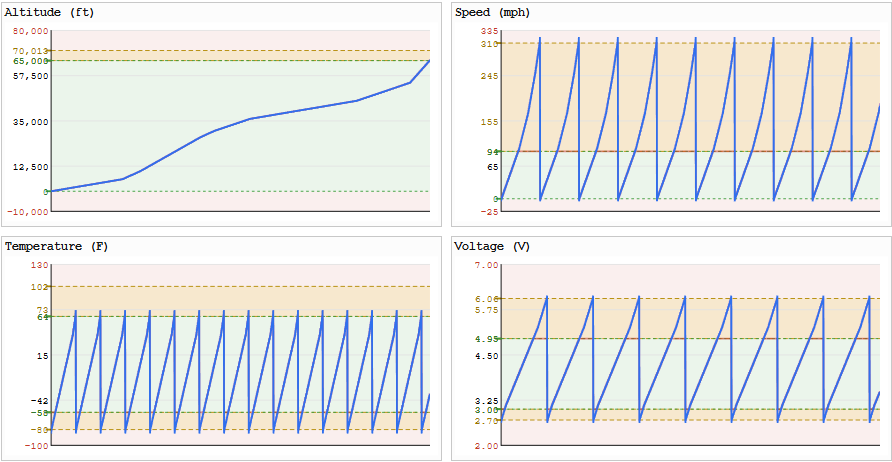
Comprehensive Simulator / Test Harness

Testing now makes use of new Simulator capabilities, such as:

  • Simulating any scenario, directly feeding encoded data into the live Dashboard
    • No need to transmit to test
  • 27,000+ automated tests, across comprehensive input values, midpoints, etc
    • Test every message type (extensible to new)
    • Test pairs of messages (TT+GT, RT1+BT, etc)

Major Features

  • Simulation of "real" data by Simulator, then sent to Jetpack via JSON link
    • Encoding performed ON Jetpack using Jetpack encoder/decoder
    • Encoding performed Simulator using Dashboard encoder/decoder
    • Resulting values compared by Simulator and differences flagged
  • Drawable GPS path on map
    • With comparative view of grid4/grid6 snap-to path
  • Drawable altitude/speed/temperature/voltage values
  • Bulk Comprehensive test scenarios auto-generated
  • Window construction (any messages, any field values, in any slots)
  • Fingerprinting scenarios
    • Multiple sending profiles to operate simultaneously
      • Any band/channel
    • Multiple receiving station profiles to operate simultaneously
      • Any band/freq-offset
  • Solar angle conditions (choose date/time of simulated period)

Other Cool Stuff

  • 2.6 Mbps data throughput between Simulator and Jetpack traffic via JSON link
    • That's 325,000 bytes/sec for write, and another 325,000 bytes/sec for read
    • Reliable high-bandwidth link supports high-volume low-latency testing

More work to be done to move this set of work ahead but now much easier to test and re-test as changes get made to see what works.

Introducing Copilot Control

You can now create and send custom messages (and more!)

  • Create and send messages with any available GPS data
  • Create and send messages by using your own sensors (via I2C, ADC)
  • Send up to 5 custom messages in every 10 minute window

Overview

Copilot Control makes makes these new features available, and the Enhanced Telemetry Dashboard will automatically graph and tabulate the data you send.

In addition to lots of documentation explaining the details, there is a Walkthrough that covers the basics in a front-to-back example.

This new functionality does not change the way you use Jetpack today.

Continue to use Jetpack as you have, and use the additional functionality if/when you like.

Maiden Flight

Here (link) is the maiden flight of the new system, using both a BME280 and BMP280, sending 2 custom messages within each 10 minute window, following Basic Telemetry.

GPS Analysis from First Airborne ET Flight

Overview

I wanted to share some very interesting GPS data collected during the first flight of an Extended Telemetry UserDefind message set carrying GPS stats.

The results challenge some of my established beliefs about GPS performance relating to lock time. Some more epxeriments will shed more light on this.

The results have provided new insight and evidence into an ongoing mystery about why my tracker almost always has a 1-hour blackout period on initial launch before transmissions are received.

Major Takeaway Summary

Summary

  • The GPS appears to have a huge problem with getting locks while rising
    • Compared to, say, staying at ground level, or floating at altitude
    • Not seemingly correlated with ground speed
  • There is approximately a 1 hour period of time from launch in my area (NYC area) to first transmission, seemingly due to GPS inability to get a lock
  • The number of Chinese GPS satellites visible in flight rises significantly during flight

Telemetry's Future

Overview

Common telemetry questions:

  • Where is telemetry documented? (For implementation or curiosity)
  • Can telemetry be extended? And to what?
    • Who decides these things?

This change aims to answer those questions and provide a path forward.

Short answer -- it's documented here, we can extend it, and we all get to decide how.